Software and knowledge systems that actually get used

Maloha Coast is a small studio in Malaysia. We believe most software fails for a simple reason: it was built around features instead of around how people actually work. So we start there. We work from the real problem, the real person using it, and the smallest thing that solves it. The interesting part is rarely the screen. It is the data model underneath, the context that makes the system worth returning to, and whether it still holds up six months into real use.

Products

  1. № 01

    Sundry

    Project

    Keep what your kids make, so grandparents see it in one tap.

    • Next.js App Router
    • React 19 + TypeScript
    • Tailwind v4
    • Electron
    • Cloudflare D1 + R2
    • Living Graph
    Product details

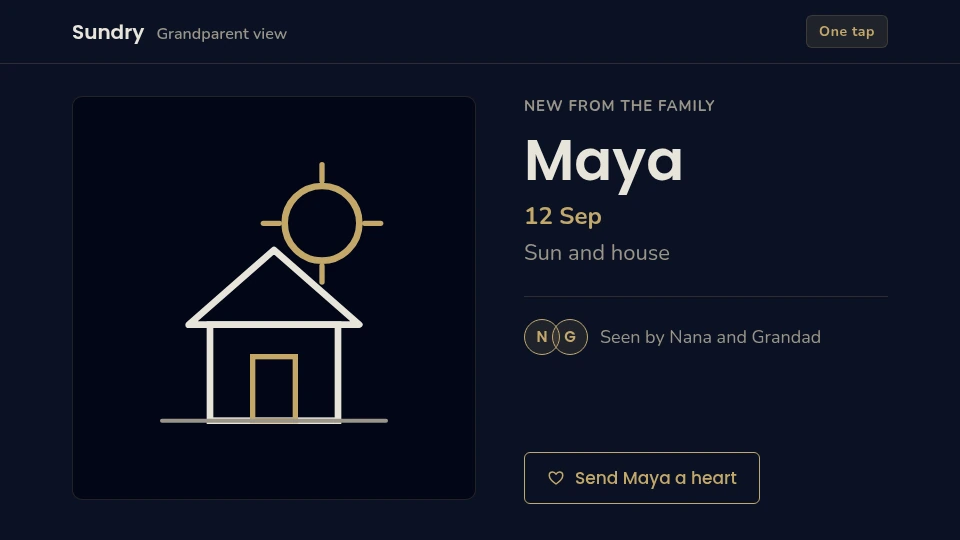
    Grandparents love seeing what their grandchildren make. The problem is everything that gets in the way: the photos live in one parent's phone, sharing means five taps and an app install, and the artwork ends up in a camera roll nobody looks at again. Sundry removes those barriers. It is a private family archive for children's artwork and milestones, with a deliberately stripped-down view for grandparents. One tap to open, one tap to send a heart back.

    The design driver is the receiving end. If the person you are sending to has never installed an app and will not learn one, then the software has to meet them where they already are. Everything else follows from that constraint.

    Under the hood, Sundry keeps a Living Graph: a map of the people, objects, dates, and relationships in a family's life, plus where each piece of information came from and any corrections a human made along the way. That structure is why the archive stays useful. Instead of a folder of files you never open again, the system can resurface the right memory at the right time. An anniversary, a milestone, a piece of art from three years ago.
    Product detail

    Sundry

    Grandparents love seeing what their grandchildren make. The problem is everything that gets in the way: the photos live in one parent's phone, sharing means five taps and an app install, and the artwork ends up in a camera roll nobody looks at again. Sundry removes those barriers. It is a private family archive for children's artwork and milestones, with a deliberately stripped-down view for grandparents. One tap to open, one tap to send a heart back.

    The design driver is the receiving end. If the person you are sending to has never installed an app and will not learn one, then the software has to meet them where they already are. Everything else follows from that constraint.

    Under the hood, Sundry keeps a Living Graph: a map of the people, objects, dates, and relationships in a family's life, plus where each piece of information came from and any corrections a human made along the way. That structure is why the archive stays useful. Instead of a folder of files you never open again, the system can resurface the right memory at the right time. An anniversary, a milestone, a piece of art from three years ago.

    Technically, it delivers one Next.js and React 19 application through two surfaces: a browser and an Electron desktop build for a local vault. Cloudflare runs it as an OpenNext worker over D1 for relational data, R2 for backups and media, and static assets. Stripe handles subscriptions, Sentry watches for errors, and PostHog measures product usage.

    Sundry architecture Browser and Electron delivery surfaces connect to a Next.js OpenNext worker. It uses D1, R2, Images, and assets bindings, with a Living Graph context layer and connected billing, error, and analytics services. Delivery surfaces BrowserNext.js App RouterReact 19TypeScript Electron desktopelectron/local vault Sundry on Cloudflare OpenNext workerNext.js App Router · Tailwind v4@opennextjs/cloudflare.open-next/worker.js Living Graph context layeringestion → entity extractiongraph store → visual canvas Bindings D1 · DBsundry · 11 mig. R2 · BACKUPSsundry-backups R2 · MEDIAsundry-media Connected services Stripesubscription billing Sentryerror monitoring PostHogproduct analytics ASSETS.open-next/assets context bindings services + assets sundry.malohacoast.com
    Sundry delivers the same Next.js + React 19 app through the browser and as an Electron desktop build. Cloudflare serves it via an OpenNext worker over D1 (relational), R2 (backups + media), Images, and static assets. A Living Graph context layer holds entities, relationships, and provenance; Stripe, Sentry, and PostHog connect as external services.
    Keep what your kids make, so grandparents see it in one tap.
  2. № 02

    Notimon

    Live

    Write a line, drill closed-book, see what you forgot.

    • Spaced repetition
    • Closed-book recall
    • PixiJS + React
    • TanStack Router
    • Cloudflare deploy
    Product details

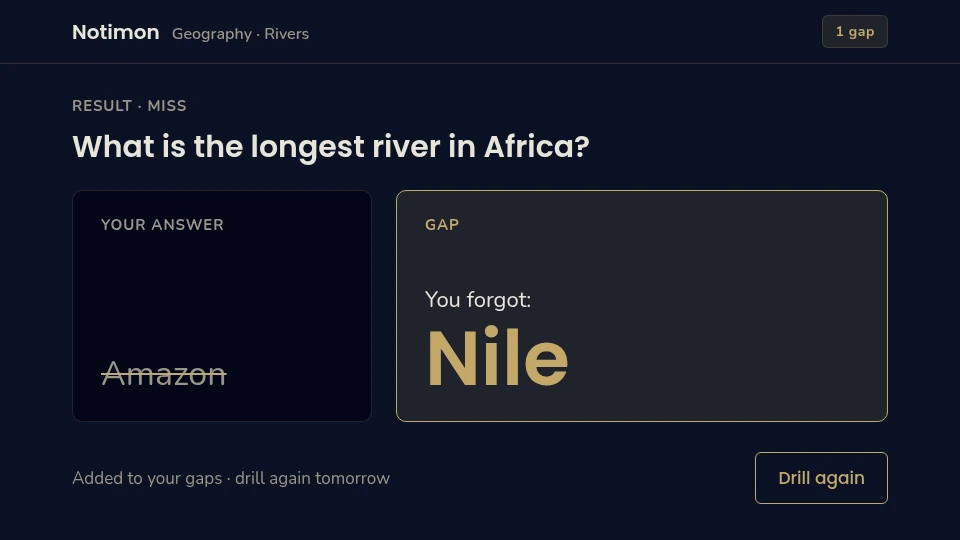
    Most study tools are built around a flashcard deck: you flip a card, you rate how well you knew it, and you move on. That approach has a quiet flaw: you are grading yourself, and you tend to be generous. Notimon starts from the opposite direction. You write the answer from memory, closed-book, and the system scores what you actually produced.

    Every miss becomes a tracked gap, and each gap resurfaces on its own schedule until it is genuinely closed. The unit of progress is a gap you have closed, not a card you have reviewed. That single change turns studying from a task you complete into progress you can watch accumulate.

    The note surface is a PixiJS canvas: notes grow into plants, and [[backlinks]] between them become vines. It is playful on purpose. It gives you a reason to return to the notes, which is the hardest part of any knowledge tool. Underneath, it is a React and TanStack Router application with a domain-driven, event-driven core.
    Product detail

    Notimon

    Most study tools are built around a flashcard deck: you flip a card, you rate how well you knew it, and you move on. That approach has a quiet flaw: you are grading yourself, and you tend to be generous. Notimon starts from the opposite direction. You write the answer from memory, closed-book, and the system scores what you actually produced.

    Every miss becomes a tracked gap, and each gap resurfaces on its own schedule until it is genuinely closed. The unit of progress is a gap you have closed, not a card you have reviewed. That single change turns studying from a task you complete into progress you can watch accumulate.

    The note surface is a PixiJS canvas: notes grow into plants, and [[backlinks]] between them become vines. It is playful on purpose. It gives you a reason to return to the notes, which is the hardest part of any knowledge tool. Underneath, it is a React and TanStack Router application with a domain-driven, event-driven core.

    Notimon architecture Web and Electron shells share the Storage Adapter interface. The adapter chooses local storage, Electron markdown files, or a remote API; web accounts use Better Auth and D1. Product shells Web appReact · TanStack StartNitro → notimon-webnotimon.malohacoast.com Electron desktopelectron/local-first shell Shared core Garden canvasPixiJS · filters · GIFHowler · Radix · Tailwind v4 Storage Adapterone interfacechosen by platform Storage backends LocalStorageAdapter · web default FileSystemAdapterElectron · markdown RemoteStorageAdapter · web + API Online accounts and play Better Authmagic link · Email D1 · DBnotimon-auth · 0001_auth Separate online-play API worker./server · notimon-api.malohacoast.com notes + gaps select backend online play Local-first: a gap ledger, not a flashcard deck.
    Notimon shares one Storage Adapter interface across its web and Electron shells. The platform selects local storage, markdown files, or the remote API with no change to app code. The web worker handles accounts with Better Auth magic-link email over D1; online play is a separate API worker, so the core app works fully offline.
    Write a line, drill closed-book, see what you forgot.
  3. № 03

    Restaurant OS

    Project

    Guests claim limited food over WhatsApp before it sells out.

    • Bun
    • TypeScript
    • Cloudflare Workers
    • D1
    • WhatsApp API
    Product details

    A restaurant does not fail because it cannot take an order. It fails because the menu, the order, the calendar slot, the loyalty balance, and the voucher all live in different places. A till, a notebook, a spreadsheet, three chat threads. None of them agree. Restaurant OS is a single operations platform that holds all of it in one place: menu, orders, time slots, loyalty, and vouchers for restaurants.

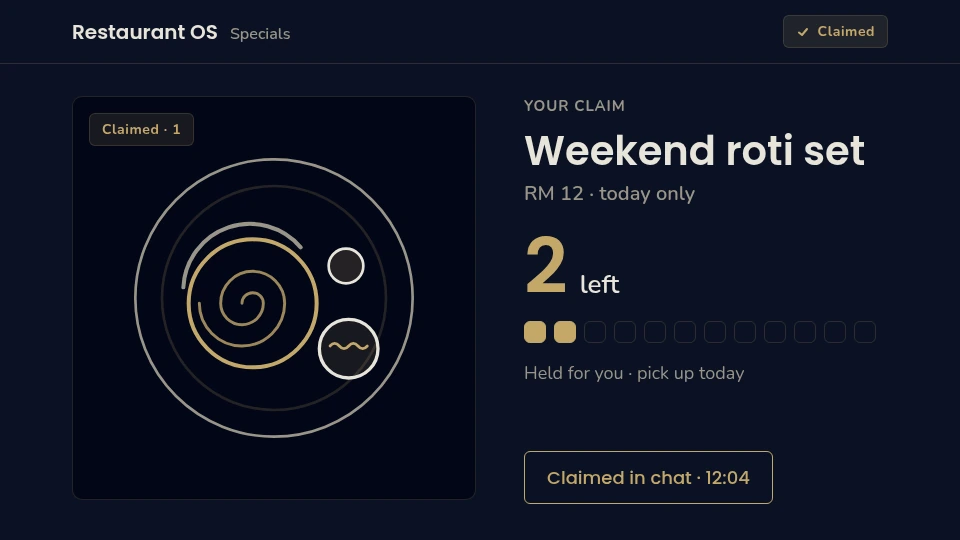
    Guests claim limited food over WhatsApp before it sells out, which matters because a scan of what is actually available and a simple yes/no is often the whole transaction. The system has to be right about what is left, in real time.

    One deliberate design decision shapes the architecture: the part of the system that answers requests runs separately from the part that runs scheduled background work: expiring vouchers, releasing time slots, recalculating loyalty tiers. Keeping the scheduled path out of the live path means a bad scheduled task cannot take down checkout. The live service is running today; the background worker is planned, not live.

    Internally, the codebase is organised by business domain under src/contexts/, and pricing and gating rules register as plugins keyed by rule type. Adding a new promotion or access rule means one new file plus one registry line, and PlaceOrder and the pricing pipeline do not grow new branches every time the business invents something. The database holds 17 tables across nine migrations.
    Product detail

    Restaurant OS

    A restaurant does not fail because it cannot take an order. It fails because the menu, the order, the calendar slot, the loyalty balance, and the voucher all live in different places. A till, a notebook, a spreadsheet, three chat threads. None of them agree. Restaurant OS is a single operations platform that holds all of it in one place: menu, orders, time slots, loyalty, and vouchers for restaurants.

    Guests claim limited food over WhatsApp before it sells out, which matters because a scan of what is actually available and a simple yes/no is often the whole transaction. The system has to be right about what is left, in real time.

    One deliberate design decision shapes the architecture: the part of the system that answers requests runs separately from the part that runs scheduled background work: expiring vouchers, releasing time slots, recalculating loyalty tiers. Keeping the scheduled path out of the live path means a bad scheduled task cannot take down checkout. The live service is running today; the background worker is planned, not live.

    Internally, the codebase is organised by business domain under src/contexts/, and pricing and gating rules register as plugins keyed by rule type. Adding a new promotion or access rule means one new file plus one registry line, and PlaceOrder and the pricing pipeline do not grow new branches every time the business invents something. The database holds 17 tables across nine migrations.

    Restaurant OS architecture Customer and staff browser routes reach the live Services Worker and static assets in Cloudflare. The planned Jobs Worker has a dashed muted treatment and would access the same D1 database. Browser Cloudflare Customer /store/* Staff /dashboard/* Admin access header token Services Worker · LIVE src/worker/handlers HTTP API · auth Static Assets dist/ SPA fallback Jobs Worker · PLANNED src/jobs/ · planned scheduled handler D1 · operational database menu · orders · slots · loyalty 17 tables · 9 migrations shared operational data read / write planned scheduled writes live path planned
    The live services worker handles HTTP. A separate jobs worker is planned to run cron tasks against the same D1; keeping that future scheduled path separate means a bad scheduled deploy need not break checkout. New pricing or gating rules register as plugins rather than branches inside PlaceOrder.
    Guests claim limited food over WhatsApp before it sells out.
  4. № 04

    Knowledge Base

    Live

    A queryable knowledge base that keeps every fact tied to its source.

    • markdown-as-source
    • PGLite + pgvector
    • Hybrid retrieval (RRF)
    • MCP server
    • OAuth 2.1
    • 374 pages live
    Product details

    Everything a business knows is scattered across an inbox, a set of meeting notes, and a folder of documents. The knowledge is real, but it is not findable. So people re-answer the same questions, re-learn the same context, and lose decisions that were made last year. A knowledge base fixes that. It pulls a client's email, meeting transcripts, and documents into one structured place you can actually query.

    The part people tend to skip is the part that decides whether it works: nothing is written until a human approves it. The pipeline reads and proposes, a person reviews and accepts or rejects, and only then does the fact land in the brain. That review step is what keeps a knowledge base trustworthy instead of slowly filling with confident nonsense.

    Retrieval is hybrid: full-text search finds exact terms, vector search finds things by meaning, and the two ranked lists are fused so you get the best of both. Every fact keeps a link back to the message it came from, so you can always check the source. The client owns the underlying data as plain markdown in a GitHub repository they can open in Obsidian. It is structured memory that survives any single app. Each client runs as an isolated tenant with their own dashboard view.

    Product detail

    Knowledge Base

    Everything a business knows is scattered across an inbox, a set of meeting notes, and a folder of documents. The knowledge is real, but it is not findable. So people re-answer the same questions, re-learn the same context, and lose decisions that were made last year. A knowledge base fixes that. It pulls a client's email, meeting transcripts, and documents into one structured place you can actually query.

    The part people tend to skip is the part that decides whether it works: nothing is written until a human approves it. The pipeline reads and proposes, a person reviews and accepts or rejects, and only then does the fact land in the brain. That review step keeps a knowledge base trustworthy instead of slowly filling with confident nonsense.

    Knowledge base architecture Emails, dashboard notes and markdown files flow through a human-reviewed ingestion pipeline into a single PGLite brain. Hybrid full-text and vector retrieval is fused with reciprocal rank fusion and exposed to agents over an MCP server with OAuth. Ingestion sources · email, dashboard, files Email inbox info+<client>@… +alias routing Dashboard notes composer capture ad-hoc notes Files · markdown PDF · docs · sites vault imports Gmail as queue unread = pending self-healing Ingestion pipeline · human-in-the-loop review Poll · triage 3-layer dedup source-URI check Classify · extract type + entities links resolved Review queue approve or reject nothing unseen Commit to brain zero pollution entity pages Single brain · markdown-as-source Markdown repo pages · sources plain files Ingest · extract parse · chunk embed passages PGLite brain single-brain storage chunks + embeddings wikilink link graph Access + client delivery Hybrid retrieval FTS + vector RRF fusion MCP server OAuth 2.1 · TLS query · read · write Agents / clients Claude, IDEs, apps ranked context Isolated tenants per-tenant brains isolated per client approved pages only ranked context Live snapshot 374 pages · 514 chunks (all embedded)
    Markdown stays the source of truth; the brain stores chunks, embeddings, and the [[link]] graph so retrieval is hybrid, full-text and vector fused with RRF. Agents reach it over MCP behind OAuth 2.1, and each client can be deployed as an isolated tenant with their own dashboard view.

    Built on gbrain. The underlying knowledge engine is gbrain, created by Garry Tan (Y Combinator). Maloha Coast builds the layer on top: the ingestion pipeline, the review and approval workflow, the retrieval configuration, and the dashboard and UI/UX that make it usable day to day.

  5. № 05

    Directories

    Project

    A small portfolio of niche directories, each one built around a single need families keep searching for. One is live today and five more are on the way.

    • Sokong Sekolah Live
    • Pantang Amanah Coming soon
    • Kelas Cilik Coming soon
    • Sokong Tumbesaran Coming soon
    • Misai Vet Coming soon
    • Sesap Coming soon
    Sokong Sekolah details

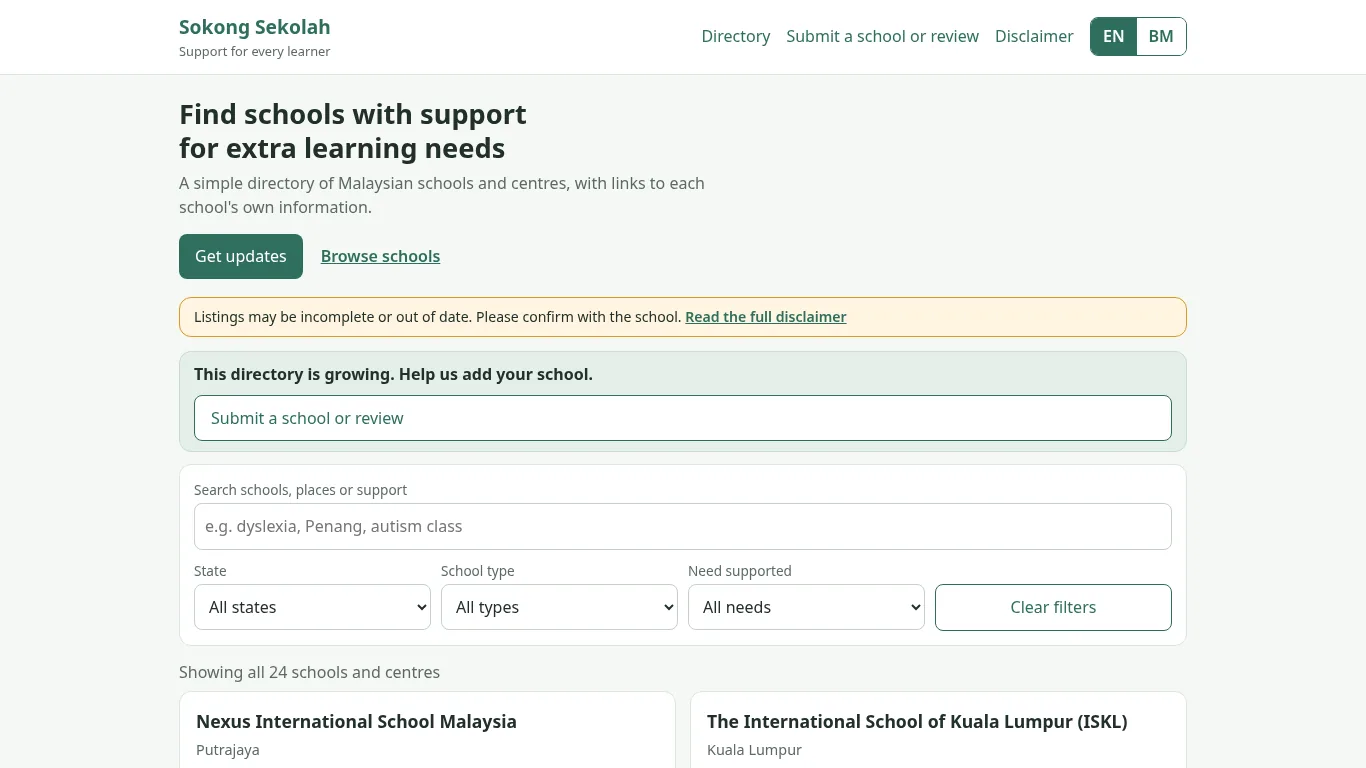
    Parents of children with extra learning needs often have to phone school after school just to learn what support exists. Sokong Sekolah is a free directory that gathers it in one place: learning support units, shadow aides, exam accommodations, and on-site therapy. It works in English and Bahasa Malaysia, and you can filter by state, school type, and the need you are looking for.

    Parents and schools can submit a listing or a correction through a short form, and there is a newsletter for updates. Listings are based on public information, so the directory always points back to each school's own details and asks families to confirm with the school directly.

    It runs on Cloudflare Pages, with Pages Functions and a D1 database behind it, plus a small admin CMS for reviewing submissions and keeping listings current.
    Product detail

    Sokong Sekolah

    Parents of children with extra learning needs often have to phone school after school just to learn what support exists. Sokong Sekolah is a free directory that gathers it in one place: learning support units, shadow aides, exam accommodations, and on-site therapy. It works in English and Bahasa Malaysia, and you can filter by state, school type, and the need you are looking for.

    Parents and schools can submit a listing or a correction through a short form, and there is a newsletter for updates. Listings are based on public information, so the directory always points back to each school's own details and asks families to confirm with the school directly.

    It runs on Cloudflare Pages, with Pages Functions and a D1 database behind it, plus a small admin CMS for reviewing submissions and keeping listings current.

    Sokong Sekolah directory home page with search, state, school type and need filters.

Client Work

  1. № 06

    Knowledge Systems

    Client engagements

    We turn a business's scattered email, meetings, and documents into a knowledge base you can actually ask questions of.

    • PGLite + pgvector
    • Hybrid retrieval (RRF)
    • MCP server
    • OAuth 2.1 + TLS
    • Markdown-as-source

    An ingestion pipeline that pulls a client's email, meeting transcripts, and documents into one knowledge base. Nothing is written until a person reviews it, so the base stays accurate instead of filling with guesses. Retrieval is hybrid: full-text search for exact terms, vector search for meaning, and the two ranked lists fused together. Agents reach the base through an MCP server behind OAuth. Every fact keeps a link back to the source message it came from. The client owns their data as plain markdown in a GitHub repository they can open in Obsidian, and each client runs in their own isolated tenant.

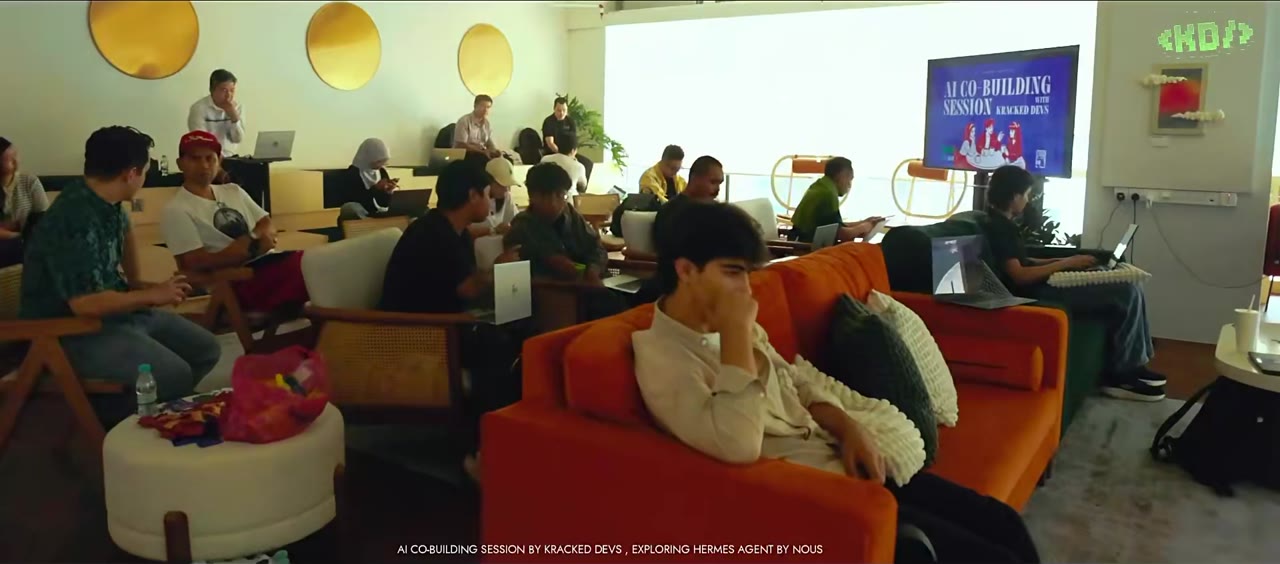
Builders seated with laptops at the Hermes Malaysia AI co-building session in Kuala Lumpur.

Kracked Devs · Kuala Lumpur

Hermes Malaysia #2: AI Co-Building Session

2 July 2026 · Common Ground, Menara Darussalam, KLCC
Co-hosted with Danial Hadi

Fifty builders signed up, with more on the waitlist. The goal was simple: everyone leaves with their own assistant in their pocket, connected to their Hermes agent. Some went straight for a server, others got it running on their laptop.

Building something that needs a calm, useful product?

Start a project

About

Sayf Tun-Ismail

Director, Maloha Coast · Kuala Lumpur, Malaysia

I build software for people who have a real problem and no patience for a product that looks clever but does not help. Most of my work starts the same way: sit with the person who has the problem, watch what they actually do, and find the smallest thing that changes their day. Features come last. The problem comes first.

My background is web applications, with a long stretch in React and Ruby on Rails. That is where I learned to care about the unglamorous parts: how data is modelled, how state stays honest, and how a system holds up once real people start using it in ways you did not plan for. I have spent enough time shipping to know that the interesting engineering is rarely the visible screen.

At Maloha Coast I run a small studio and lead the product work end to end, from framing the problem through to the version people depend on. I also train and mentor developers, which keeps me honest: teaching forces you to explain why a decision is right, not just that it works.

The thread running through everything I build is this: software should leave you with something you own. The knowledge systems I build store a client's information as plain files in their own repository, not locked inside an app. The products I design can be understood six months later by someone who did not write them. If it cannot survive that test, it is not finished.

Speaking · 2 July 2026

Hermes Malaysia #2

AI Co-Building Session · Kracked Devs · Kuala Lumpur

Hermes Malaysia #2 was the second Kuala Lumpur session run by the KrackedDevs community, and the first one I co-hosted. The format was deliberately not a talk. No panels, no slide decks, no presentations. Fifty builders signed up, with more on the waitlist, and the room at Common Ground in Menara Darussalam was full of open laptops from the first minute.

The premise was that the fastest way to understand an AI agent is to build one. So instead of explaining Hermes Agent by Nous Research from a stage, we set it up together. People arrived with half-finished ideas, installed the agent on their own machines, connected it to the tools they already used, and then started breaking things to see what held. Some chose to run it on a server for always-on availability. Others wanted it running locally on their laptop. Both paths worked, and that choice became one of the most useful conversations of the afternoon.

The goal I set for the session was concrete. Everyone should leave with their own assistant in their pocket, actually connected to their Hermes agent, not just a screenshot of someone else's. That means a working memory, a set of skills, and a habit of using it past the first hour, which is where most tool experiments quietly die. Getting fifty people across that line in one afternoon is the part I am most proud of.

What I took away is the same lesson that shows up in every workshop. The value is not in the feature tour. It is in watching someone hit a real wall, get unstuck, and then immediately start building something you did not plan for. That is when the tool stops being a demo and starts being part of how they work.