I turned 1,306 X bookmarks into a wiki with my Grok Bot
1,306 X bookmarks, saved since 2019, now sit on topic pages I can search in one tab. No separate wiki app, no extra AI service, no filing by hand. This is how my Grok Bot did it, and how you can set up the same thing with one prompt.
Updated 3 Nov 2026. Also on X: the article.
I have a habit on X. When a post looks useful, I bookmark it: a thread on AI agents, a Kubernetes tutorial, a fix for a problem I'll hit one day. I tell myself I'll come back to it...but almost never do.
By October 2026 the pile was 1,306 posts deep, in one long list with no folders. Finding an old one meant remembering it existed and then scrolling until I got lucky.
So I handed the whole pile to a Grok Bot and asked it to turn the list into a wiki. I called the bot SayfBrain. Now I can search every post and browse them by topic and author.
Get it running
You need a Grok Bot with the X plugin connected. Then pick one of these.
Option 1: paste one prompt
Paste this prompt below into your Grok Bot, or into dr eggbot, a bot that builds Grok Bots. Either one creates the wiki bot for you!
Create a bot called MyBrain. One job: keep my X bookmarks as a searchable wiki in a folder called brain/.
- Read my bookmarks with the X plugin. Read only: never post, like, delete or bookmark anything on X.
- Ask for 50 bookmarks per page, not 100, and follow the next page token until there is none.
- Keep every post in bookmarks.jsonl, one line per post keyed by post id. Add new lines and skip
  duplicates. Never delete or rewrite a line.
- From that file, keep one Markdown file per post in brain/raw/x/, never edited once saved, and one page
  per topic (start with about 30 topics, at most 150 posts a page) linking back to its posts,
  plus index.md (one line per page) and log.md (a running history).
- Save every change with Git. Do a dry run before anything that writes, and tell me the counts.
- You are the only bot that writes to these files. Other bots may read them.
- If you're unsure, say so instead of guessing.
- Save yourself a weekly routine: read my newest bookmarks 50 per page and follow the next page token.
  Stop after 50 posts in a row that you already have, or when there are no more pages. Then file the
  new ones, commit, and tell me how many were new. Warn me if the pages ran out before you found
  a post you already had.
Then wait for my first request.
Once the bot exists, ask it to pull 20 bookmarks as a test, check the counts, then let it pull the rest.
Option 2: add the template
If you'd rather skip the prompt, add Bookmarks Brain, a template of my wiki bot: https://x.ai/bot/e6ZhqDkcH5ch4vCMwvpvp
It comes with the same job rules, the weekly pull routine and the X plugin. A getting-started guide walks you through connecting X and a dry-run first pull.
Option 3: extras, if you want them
- A dashboard builder that turns the files into a search page and a map. My Design bot does this.
- A reader bot that reads the wiki or the bookmark file. My X Drafts bot reads the bookmark file to study post formats.
- A main bot that hands wiki work to the wiki bot. My Ops bot does this.
Only the wiki bot writes. The others just read its files.
Whichever you pick, the bot only reads X. It never posts, likes or deletes anything there.
Here's what that prompt builds, and how I got there.
The idea: a library, not another chat
Imagine a research assistant. You hand them articles you liked, and they file each original and keep a notebook with one page per subject. A month later you ask, "What have I saved about AI agents?" They don't reread the pile. They open the AI agents page.
That's an LLM wiki. LLM stands for large language model, the AI inside your Grok Bot that reads and writes text.
The library is a folder of plain text files that notes apps like Obsidian can open. It has two parts: saved originals, one file per bookmark that never changes, and topic pages the bot writes, each pointing back to its originals.
When a new source arrives, the model doesn't just store it for search later. It updates the pages it touches, adds links, refreshes an index and appends to a log. SayfBrain's instructions call this compiling on every ingest.
The idea comes from Andrej Karpathy. When he shared a personal wiki built this way, the first reason he gave for liking it was that the memory is explicit. That's the part I care about too. I can open the files and read what the bot knows.
Why I didn't just install GBrain
GBrain is Garry Tan's open-source wiki project, built for his own AI agent.
I didn't install it. For one person's bookmarks it felt like bloat, and it meant plugging in outside AI models. So I had my Grok Bot build a lean version that uses Grok's built-in models and keeps the same core rules. Never edit a saved original, keep an index and a log, and save every change with Git. Git keeps a folder's full history, so it works as a rewind button.
Why it runs on a Grok Bot
I could keep a wiki like this by hand. A Grok Bot adds three things I needed.
- It runs on a schedule. A Grok Bot can have routines, so the wiki can grow without me starting a chat.
- It has connectors. The X plugin lets the bot read my bookmarks directly, and those reads are free.
- It shares a computer with my other bots. The wiki is a folder on that machine, so any of my bots can read it.
How mine came together
I didn't have the one prompt when I started. I built SayfBrain one request at a time, and several rules in the prompt came from a mistake.
Getting every bookmark. X sends your bookmarks in pages, and each page ends with a marker that says "there's more." When I asked for 100 per page, X sent 99 posts and no marker, so I thought that was everything. With 50 per page, the marker kept coming. My saved copy went from 131 posts to 1,306, reaching back to 2019. That's why the prompt says 50 per page.
Everything lands in one file, bookmarks.jsonl, one post per line. The bot only adds lines, so the wiki can always be rebuilt from it.
One file per post. Next the bot wrote a small script that turns each line into its own file. It never rewrites a file that exists, and a second run with nothing new changed nothing.
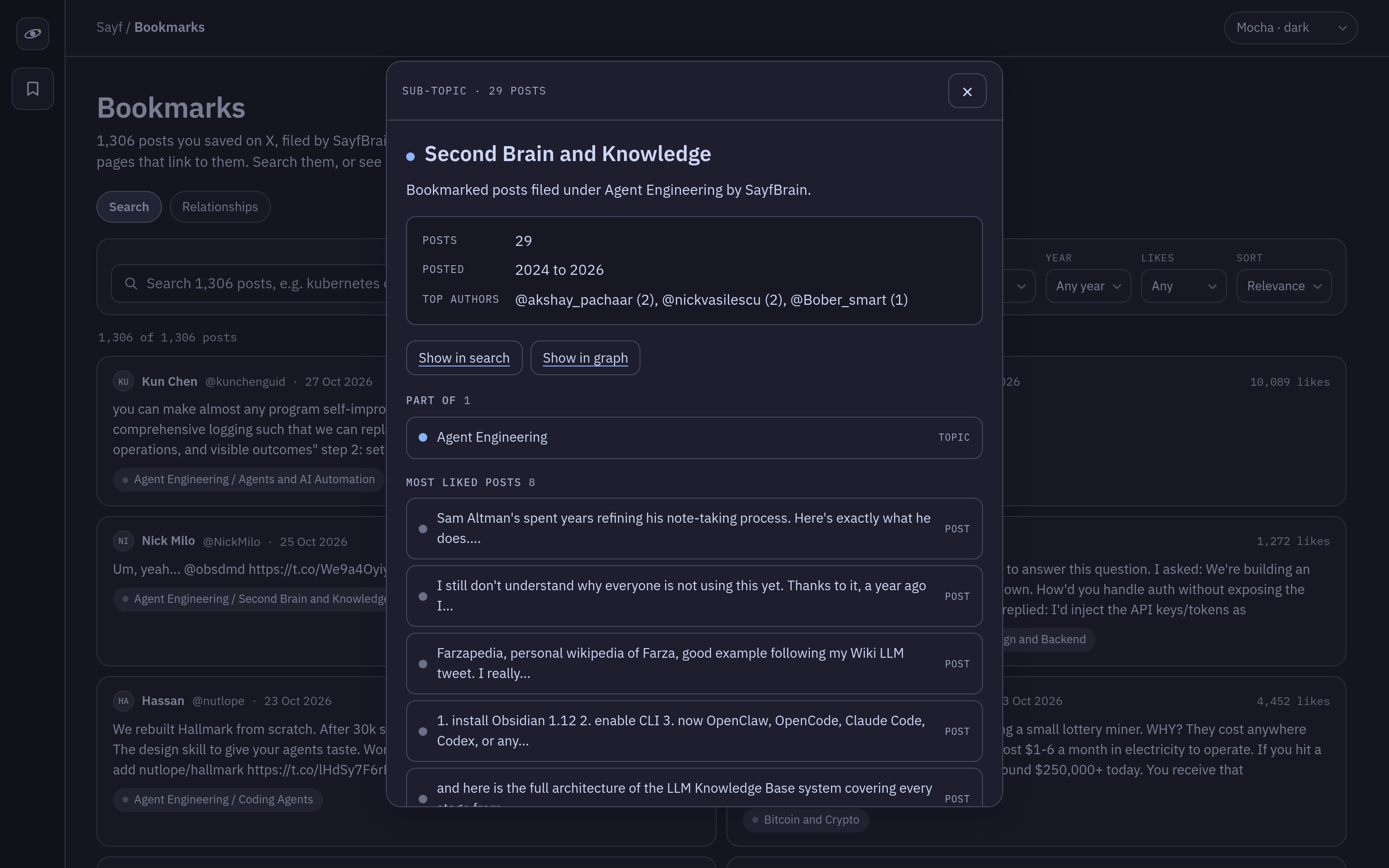
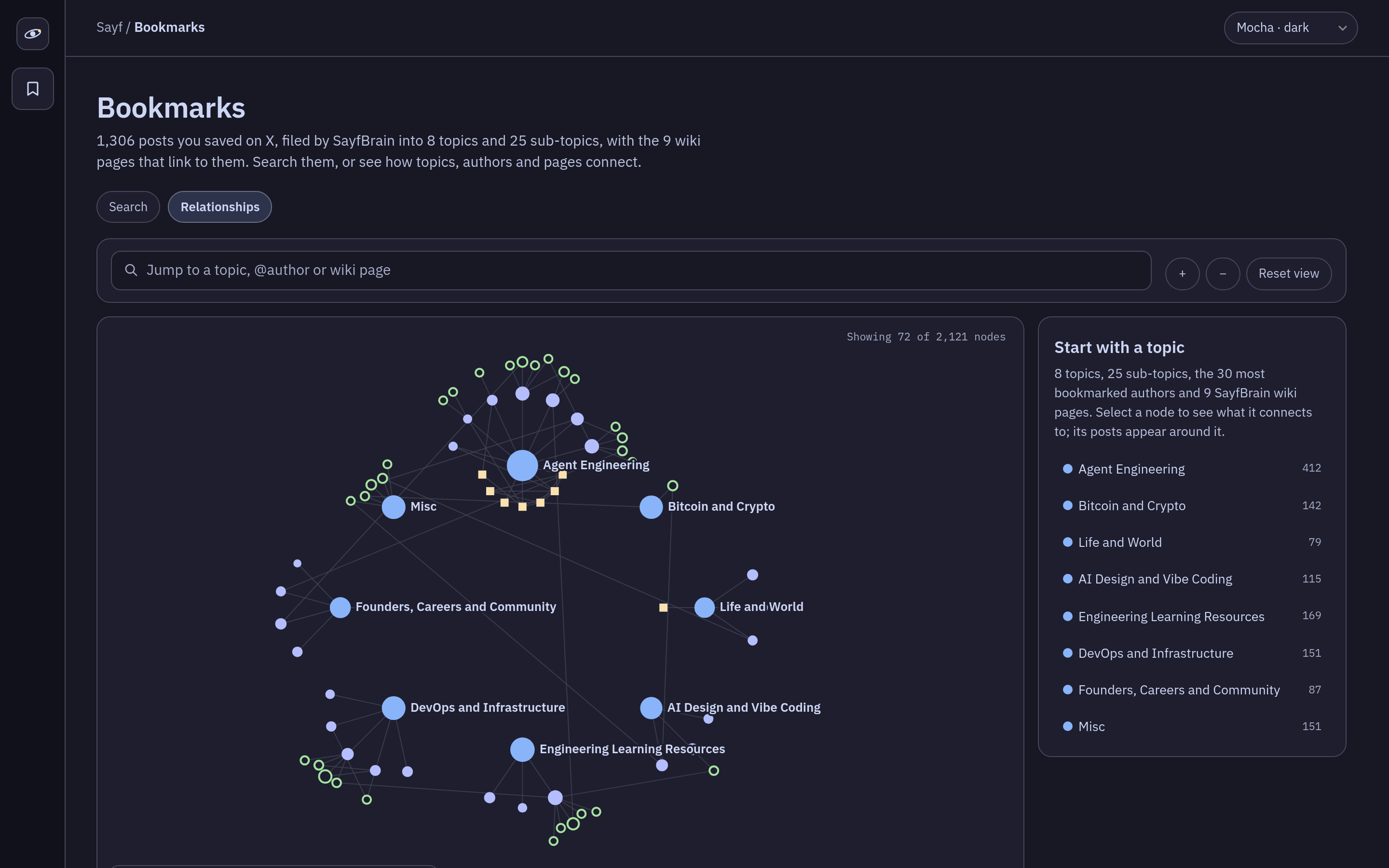
Sorting the pile. The same script sorts posts with keyword rules, checked in order. A post mentioning Docker or Kubernetes lands in Containers and Kubernetes. The first match wins, and anything that matches nothing goes to Misc. It's crude, but I can read the rules. Agent Engineering, my biggest topic at 412 posts, spreads across seven sub-topic pages.
Keeping it growing. SayfBrain saved itself a weekly routine for Monday mornings, around 9am my time. The hard part was knowing when to stop. My first version stopped at the first post it already had. But if you re-bookmark an old post, it jumps to the top of the list, and a bot that stops there never sees the new posts below it.
A reply from @akai_1027 suggested the fix, an overlap window. Now it keeps reading until it has seen 50 posts in a row that it already has, or X runs out of pages. The bot drops duplicates by post id, so reading a post twice costs nothing.
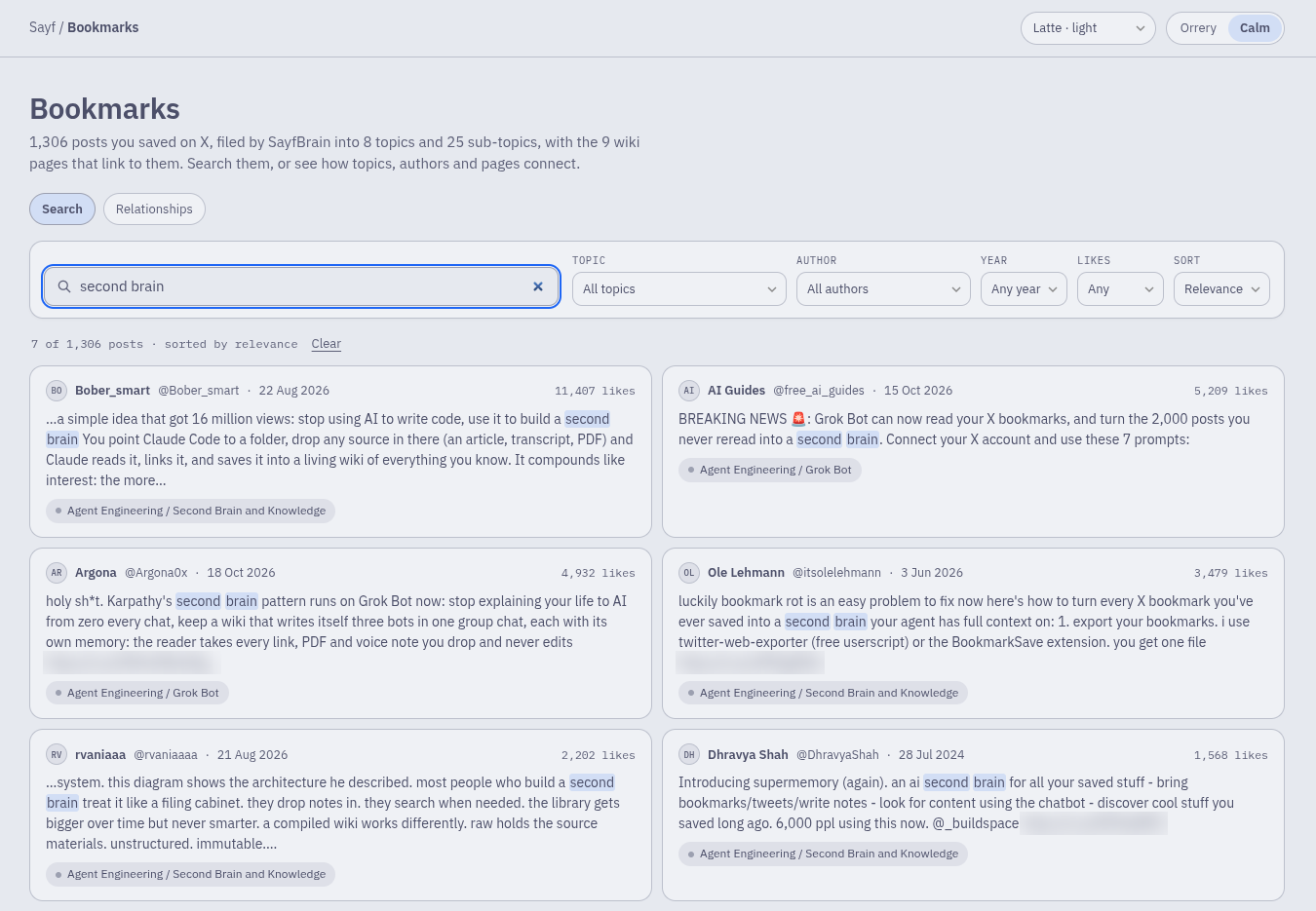
A search box and a map. My Design bot then built a Bookmarks tab on my private dashboard from the same files. Search filters by topic, author, year and likes. "kubernetes" returns 31 posts. The map has 2,121 dots for posts, authors and pages, and opens up whatever you click.
What went wrong
- A bot message said my oldest bookmark was from 2021. The file had one from 2019.
- The log, a bot reply and the dashboard gave three different page counts. Each counted something different.
- Rough keyword rules. 151 posts ended up in Misc, so the rules need work.
Add the 99-post "limit" and the first stop rule, and the lesson is the same. A bot's confident summary isn't proof, so I ask it to recount from the files. That's why the prompt asks for a dry run and counts before anything writes.
Where it stands
- 1,306 bookmarks, each in its own file, from 773 authors
- 33 generated pages, none over 142 posts
- Biggest topics: Agent Engineering 412, Engineering Learning Resources 169, DevOps and Infrastructure 151
All of that came from one backfill. First weekly run, 2 Nov 09:08 MYT: 24 new bookmarks, 1,330 total.
If I started over, I'd write the reading rules in before the first pull, the way the prompt does, and use the X plugin from day one. One pull through the paid X API cost me credits, while the plugin's reads are free.
I'm not going to reread 1,306 bookmarks. But when I remember a post about agent auth, I search one tab instead of scrolling.
Paste the prompt or add the template tonight, and start with 20 bookmarks. If you want a setup like this built for you, start a project at malohacoast.com. Or follow along on X: @sayfism.